

Download Windows 7 Christmas Theme – free festive desktop theme for Windows 7
Overview
The holiday season is the perfect time to give your computer a fresh splash of color, cheer, and nostalgia. Windows 7 Christmas Theme does exactly that by turning an ordinary Windows 7 desktop into a vibrant winter wonderland. This free theme pack bundles a carefully curated collection of high‑resolution wallpapers, holiday‑themed icons, a jolly cursor set, seasonal sound effects, and even a set of optional gadgets that showcase snowflakes, countdown timers, and festive animations.
All assets are designed to work harmoniously, creating a consistent visual language that feels both classic and contemporary. Whether you’re a long‑time Windows 7 enthusiast or a newcomer looking for a quick festive makeover, this theme delivers a bold, bright, and cheerful atmosphere without sacrificing performance. Installation is straightforward – no registry hacks or deep system tweaks are required.
Simply extract the archive and double‑click the provided .themepack file, and Windows takes care of the rest. Once applied, you can further personalize the experience by adjusting wallpaper rotation intervals, toggling sound cues, or swapping individual icons. The theme also includes a separate screensaver package for those who want their idle moments to sparkle with holiday lights.
Overall, the Windows 7 Christmas Theme is an excellent example of how a well‑crafted visual pack can lift the mood of your workspace, bring a smile to your face, and spread the spirit of the season with minimal effort.
Key Features
- Seasonal Wallpapers: Six high‑definition images featuring snowy landscapes, twinkling lights, and classic Christmas motifs.
- Festive Icons: Over 50 custom icons for folders, shortcuts, and system utilities, all styled with red, green, and gold accents.
- Jolly Cursor Pack: A set of animated cursors that turn every click into a tiny celebration.
- Holiday Sound Effects: Subtle sleigh‑bell chimes and ambient winter sounds that play on startup, shutdown, and when notifications appear.
- Custom Gadgets: Snowflake fall‑out, Christmas countdown timer, and a “Nice List” widget that can be placed on the desktop.
- Adjustable Wallpaper Rotation: Built‑in settings let you switch wallpapers every 5, 15, or 30 minutes.
- Separate Screensaver: A optional screensaver featuring animated ornaments and a gentle snowfall effect (installed separately).
- Lightweight & Secure: All files are virus‑free, under 30 MB total, and designed not to impact system performance.
Installation, Usage & Compatibility
Installing the Windows 7 Christmas Theme is intentionally simple to accommodate users of all technical levels. First, download the .rar archive from the official site. Extract the contents using any standard extraction tool such as WinRAR or 7‑Zip.
Inside you will find a single file named Christmas_win-7themes.blogspot.themepack. Double‑click this file, and Windows will automatically launch the Personalization window, prompting you to apply the theme. After confirming, the system will copy the necessary assets into the appropriate system folders and instantly switch your desktop to the festive layout.
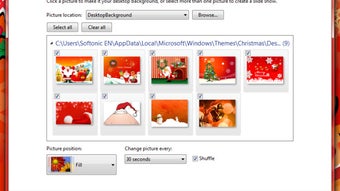
Once the theme is active, you can fine‑tune the experience through the “Desktop Background” settings. Here you can set the interval for wallpaper rotation, choose a single static image, or even add your own holiday pictures to the rotation pool. The sound effects can be toggled on or off via the “Sounds” control panel – simply locate the “Windows Default” scheme and replace it with the “Christmas” scheme included in the pack. For the gadgets, right‑click the desktop, select “Gadgets”, and drag the desired widgets onto the screen. Each gadget offers its own configuration menu, allowing you to adjust opacity, refresh rate, and position.
Compatibility: The theme is built specifically for Windows 7 (both 32‑bit and 64‑bit editions). It leverages the native .themepack format, meaning no third‑party skinning engines are required. Users running Windows 8, 8.1, or Windows 10 can still apply the theme, but some visual elements may appear out of place due to differences in the UI framework. For best results, keep your Windows 7 installation up to date with the latest Service Pack and security patches.
After installation, the theme runs silently in the background, consuming negligible RAM or CPU resources. If you ever wish to revert to the classic Windows look, simply open the Personalization window, select “Windows Classic” or any other installed theme, and click “Apply”. All changes made by the Christmas Theme are reversible, ensuring you can enjoy the holiday spirit without permanent alterations to your system.
Pros, Cons & Frequently Asked Questions
Pros
- Free and easy to download.
- Bright, high‑quality visuals that instantly lift the holiday mood.
- Comprehensive package – wallpapers, icons, cursors, sounds, and gadgets.
- No registry edits or risky system tweaks required.
- Lightweight; does not slow down older machines.
Cons
- Designed exclusively for Windows 7; limited support for newer OS versions.
- The optional screensaver must be installed separately.
- Sound effects may be distracting for users who prefer a silent desktop.
- Customization options are confined to the built‑in Windows Personalization panel.
How do I install the Windows 7 Christmas Theme?
Download the .rar file, extract it, and double‑click the .themepack file. Windows will automatically apply the theme and open the Personalization window for any final adjustments.
Can I use this theme on Windows 8 or Windows 10?
The theme is built for Windows 7, so while you can try to apply it on newer versions, some elements (especially gadgets) may not render correctly. For a flawless experience, stick to Windows 7.
Is the theme safe from viruses or malware?
Yes. The package is scanned with multiple antivirus engines before release and is under 30 MB, containing only image, sound, and configuration files.
Can I customize the sound effects?
Absolutely. Go to Control Panel → Sound → Sounds tab, select the “Christmas” scheme, and you can replace or disable individual sound events.
What should I do if the theme doesn’t apply correctly?
First, ensure you are running Windows 7 with the latest updates. Then try re‑extracting the archive and re‑applying the .themepack file. If problems persist, delete the theme folder from %AppData%\Microsoft\Windows\Themes and repeat the installation.
The Windows 7 Christmas Theme delivers a polished, holiday‑centric experience that feels both playful and professional. Its strength lies in the breadth of assets—wallpapers, icons, cursors, and sound effects all work together to create a cohesive visual story. Installation is a breeze, making it ideal for users who want instant festive flair without tinkering with system files. The only drawbacks are its strict Windows 7 focus and the need for a separate screensaver install, but these are minor compared to the overall joy it brings during the season.
Conclusion & Call to Action
If you’re searching for a quick, free, and secure way to spread holiday cheer across your Windows 7 desktop, the Windows 7 Christmas Theme is a top‑tier choice. It blends eye‑catching visuals with subtle audio cues, all while respecting system resources and user safety. The straightforward installation process means you can have a fully decked‑out desktop in under five minutes—perfect for busy professionals, students, or anyone who loves a festive workspace. Don’t let the season pass by without giving your computer a little extra sparkle. Click the download button below, follow the simple steps, and enjoy a bright, cheerful environment that will keep you smiling every time you log in.







